UART Console
⚡ Waiting for connection...
Select mode, connect your USB-TTL adapter, then authenticate
PS3 Syscon Diagnostic Tool — Web Serial UART Terminal with AES Auth & Error Decoder
⚡ Waiting for connection...
Select mode, connect your USB-TTL adapter, then authenticate
Click a decoded error or use Manual Lookup
Error codes will appear here after running errlog
| USB-TTL Pin | PS3 Board Point | Notes |
|---|---|---|
| TX | Syscon RX | If auth fails, try swapping TX↔RX |
| RX | Syscon TX | |
| GND | GND | Common ground — essential |
| 3.3V | — | Do NOT connect 3.3V to board (powered by PSU) |
Solder point locations vary by motherboard revision. Select your board type:
| Board | Models | Syscon Type |
|---|---|---|
| COK-001 / COK-002 | CECHA – CECHC | CXR (Mullion) |
| SEM-001 | CECHE | CXR (Mullion) |
| DIA-001 / DIA-002 | CECHG – CECHK | CXR (Mullion) |
3961 to 00 (from FF). Baud rate changes to 115200.
Refer to db260179's connection point images for exact pad locations on each board.
| Board | Models | Syscon Type |
|---|---|---|
| VER-001 | CECHL | SW (Sherwood) |
| DYN-001 | CECH-20xx | SW (Sherwood) |
| SUR-001 | CECH-21xx | SW (Sherwood) |
| JTP-001 / JSD-001 | CECH-25xx/30xx | SW (Sherwood) |
| KTE-001 | CECH-40xx | SW (Sherwood) |
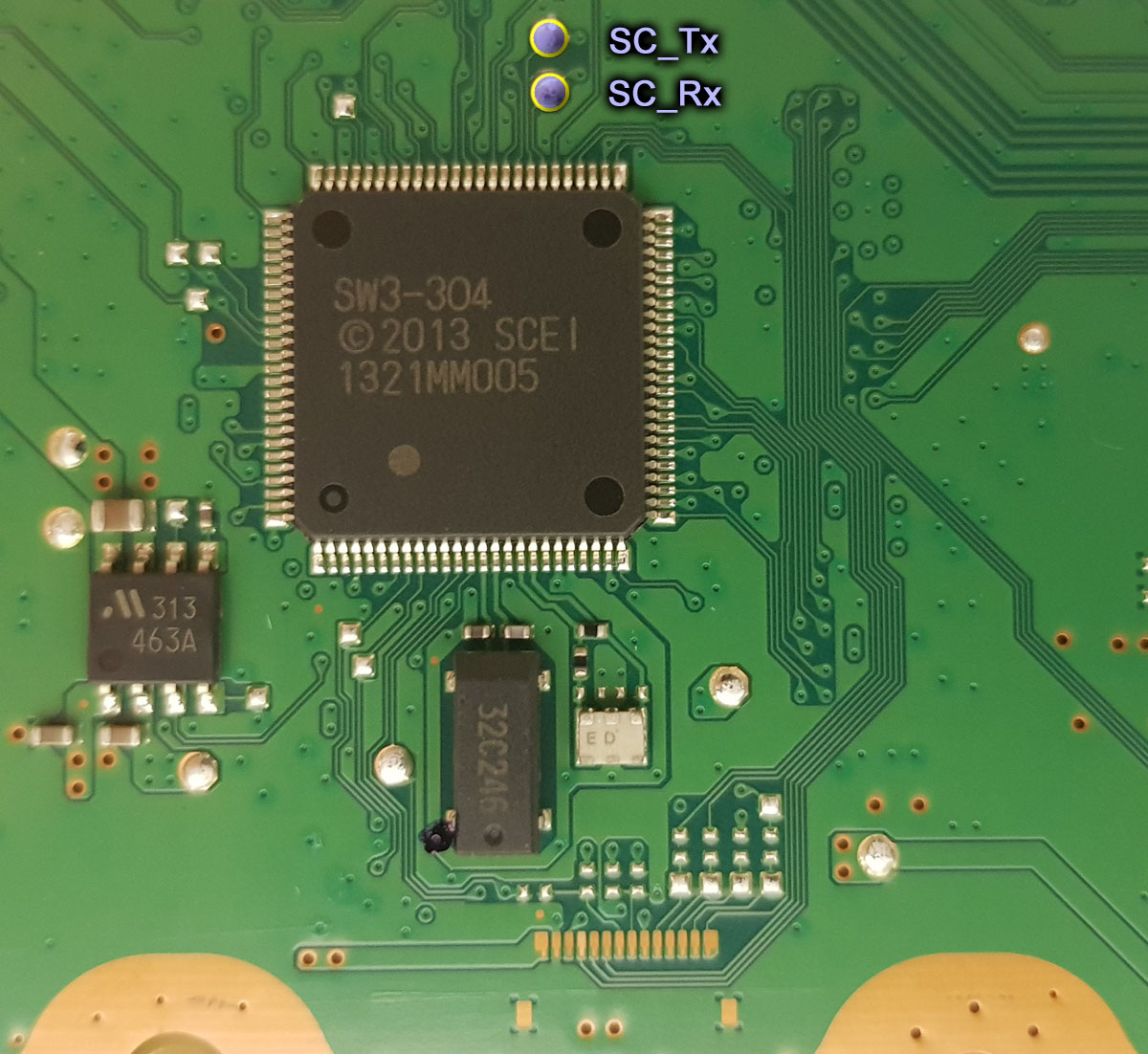
| MSX/MPX/NPX/PPX/PQX/RTX | Super Slims | SW3 (Sherwood) |
SW mode at 57600 baud and authenticate via scopen + challenge/response.
If your PS3 still boots to the XMB and can run applications, you can read the syscon error log using homebrew software:
PS3 models from CECH-25xx onward report the last error code via the front LED. The LED blinks in a pattern that encodes the error code in binary/hex:
Example: Red Red Green Red = 1101 binary = D hex. Four groups of 4 blinks gives a 4-digit hex code (e.g., 2024). Prefix with A080 to get the full code (A0802024).
Connect via UART and run errlog to get up to 32 stored error codes with timestamps. This is the most reliable and detailed method — works even when the console doesn't boot.
Syscon stores up to 32 error codes in a 0x100-byte table. Each entry is 4 bytes error code + 4 bytes timestamp. When full, the oldest error is overwritten.
Two formats exist: Mullion (CXR) and Sherwood (SW). Both are retrieved with the errlog command after authentication.
Use clearerrlog to clear old errors after a repair — avoids confusion with historical codes.
| Byte | Meaning | Values |
|---|---|---|
A | Fixed prefix | Always A |
0XX | Step number | 00–7F = Power-on step, 80 = Power-on state, 90 = Power-off, A0 = After syscon reset |
X | Category | 1 = System, 2 = Fatal, 3 = Fatal Boot, 4 = Data |
XXX | Component + Detail | Specific error identifier |
| Command | Description |
|---|---|
auth | Authenticate with syscon (AES-128-CBC challenge/response). Required before most commands. |
| Command | Description |
|---|---|
errlog | Read error log — up to 32 stored error codes with timestamps |
clearerrlog | Clear the error log table (use after repairs) |
bringup | Boot the console and watch the power-on sequence in real time |
diag | Run diagnostics |
version | Show syscon firmware version |
eepcsum | Check EEPROM checksums — useful to detect corruption |
help | List all available commands for current mode |
| Command | Description |
|---|---|
poweron | Power on the console |
poweroff | Power off the console |
fancon | Fan control / speed settings |
| Command | Description |
|---|---|
r ADDR LEN | Read EEPROM. e.g., r 3900 100 |
EEPGET addr len | Read EEPROM block (CXR external mode) |
EEPSET addr len val | Write EEPROM block — DANGEROUS! |
Click any board to see solder point photos. Images from db260179/ps3syscon. Click images to open full size.
Syscon UART test pads — DIA-001
Syscon UART test pads — DIA-002
Syscon & SB UART test pads — SUR-001 (JTP/JSD/KTE share same layout)
Syscon UART test pads — Super Slim (all models share same layout)